Azure Key Vault Deployment with Terraform (Workday API Secret Management)
This project demonstrates how to design, build, and automate secure cloud infrastructure in Azure using Terraform, following enterprise‑grade best practices.
Project Overview
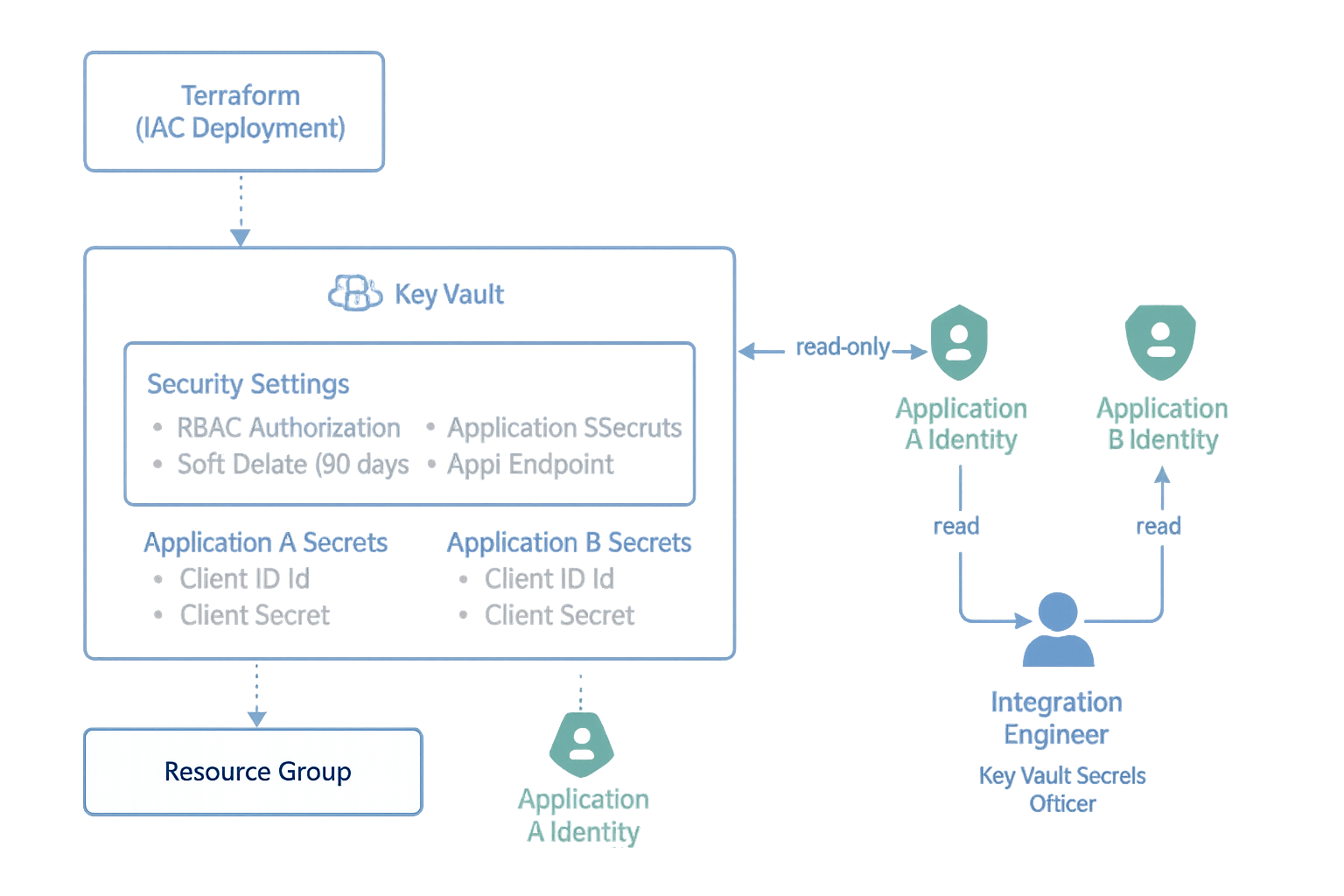
The goal of this project was to create a secure, isolated Azure Key Vault for storing Workday API credentials used by multiple client applications. The solution needed to ensure:
No secrets stored in code
Each application only accesses its own secrets
Centralized lifecycle management
Least‑privilege access model
Fully automated deployment using Infrastructure‑as‑Code (Terraform)
This Key Vault is entirely IaC‑driven and designed for production environments.
Why a Separate Key Vault?
A different Key Vault already existed for SQL Transparent Data Encryption (TDE).
I designed a separate vault to:
Avoid mixing database encryption keys with application secrets
Reduce blast radius
Enforce strict access separation
Follow Azure best practices for isolation
This ensures Workday credentials are not exposed to infrastructure admins managing SQL encryption keys.
Architecture
Resource Group
rg-workday-appsecrets-prod
Key Vault
kv-workday-appsecrets
RBAC-enabled
Soft delete + purge protection
Public/off by default (private endpoints optional)
RBAC Design
Integration Engineer → Key Vault Secrets Officer (write + rotate secrets)
Application A → Key Vault Secrets User (read-only for its secrets)
Application B → Key Vault Secrets User
Terraform manages all access declaratively
Terraform Highlights
I built the following Terraform modules/files:
Defines AzureRM provider.
Locks Terraform + provider versions for stability.
Inputs for:
Resource group
Location
Integration Engineer Object ID
Application identity IDs
Workday secret values
Creates:
Resource Group
Key Vault
RBAC authorization mode
Security hardening (soft‑delete + purge protection)
Assigns:
Integrations Engineer → Key Vault Secrets Officer
Applications → Key Vault Secrets User
Defines secrets for:
workday-appA-client-id
workday-appA-client-secret
workday-appA-endpoint
…and the same pattern for App B.
Everything is driven by terraform.tfvars so no secrets are stored in code.
What Terraform Deploys
Creates Resource Group
Deploys secure Key Vault
Enables RBAC authorization
Applies least‑privilege RBAC
Prepares vault for future Workday secret ingestion
Outputs the vault URI for application teams
Sample Terraform output:
Apply complete! Resources: 3 added, 0 changed, 0 destroyed.
Outputs:
key_vault_uri = "https://kv-workday-appsecrets.vault.azure.net/"
Secret Management Flow
Integration Engineer creates/rotates secrets in the vault.
Applications authenticate using Managed Identities or App Registrations.
Apps fetch secrets securely at runtime using:
Azure Key Vault REST API, or
SDKs (DefaultAzureCredential)
No secrets are stored in configuration files.
Validation
Used Azure CLI + Portal to verify:
Vault existence
RBAC propagation
DNS registration
Access rules
API endpoint availability
Testing verified that RBAC restrictions prevent unauthorized access:
Owners can manage the vault but cannot read secrets without data-plane roles.
Security Best Practices Implemented
Dedicated Key Vault for application secrets
RBAC-only access model
Secret-per-application isolation
No direct-sharing of credentials
No use of Access Policies (deprecated model)
No hardcoded secrets in code
Soft-delete + purge protection enabled
IaC-driven for reproducibility and auditability
Supports future private endpoints
Supports future secret rotation automation
Skills Demonstrated
Azure Key Vault
Azure RBAC
Terraform IaC (AzureRM provider)
Secret and credential lifecycle management
Secure application integration patterns
Cloud architecture & separation of duties
CLI validation & troubleshooting
Professional documentation & communication
Governance alignment with enterprise controls
What’s next for this project?
I will extend this project with:
Private endpoints for network isolation
Log Analytics diagnostic logging for auditing
Automated secret rotation
Terraform modules for multi‑app onboarding
Optional Logic App for credential rotation workflows
Azure Key Vault (RBAC) — Terraform Highlights
Production‑grade deployment for an Azure Key Vault used to store Workday app secrets with RBAC‑only authorization, soft delete + purge protection, and least‑privilege role assignments. Secrets are injected via CI/CD variables (never committed to source control).
provider "azurerm" {
  features {}
}terraform {
required_version = ">= 1.3.0"
required_providers {
azurerm = {
source = "hashicorp/azurerm"
version = "~> 3.75"
}
}
}variable "resource_group_name" { type = string }
variable "location" { type = string }
variable "integration_engineer_object_id" {
description = "Entra ID Object ID for the Integration Engineer (Secrets Officer)"
type = string
}
variable "appA_identity_id" { description = "App A identity (MI/SPN) objectId"; type = string; default = "" }
variable "appB_identity_id" { description = "App B identity (MI/SPN) objectId"; type = string; default = "" }
# Provided via CI/CD secret store (never commit values)
variable "workday_appA_client_id" { type = string; sensitive = true; default = "" }
variable "workday_appA_client_secret" { type = string; sensitive = true; default = "" }
variable "workday_appA_api_endpoint" { type = string; default = "" }
variable "workday_appB_client_id" { type = string; sensitive = true; default = "" }
variable "workday_appB_client_secret" { type = string; sensitive = true; default = "" }
variable "workday_appB_api_endpoint" { type = string; default = "" }data "azurerm_client_config" "current" {}
resource "azurerm_resource_group" "workday" {
name = var.resource_group_name
location = var.location
}
resource "azurerm_key_vault" "workday" {
name = "kv-workday-appsecrets"
location = azurerm_resource_group.workday.location
resource_group_name = azurerm_resource_group.workday.name
tenant_id = data.azurerm_client_config.current.tenant_id
sku_name = "standard"
# Security hardening
enable_rbac_authorization = true
soft_delete_retention_days = 90
purge_protection_enabled = true
}# Integration Engineer — write/rotate secrets, not vault admin
resource "azurerm_role_assignment" "integration_engineer_secrets_officer" {
scope = azurerm_key_vault.workday.id
role_definition_name = "Key Vault Secrets Officer"
principal_id = var.integration_engineer_object_id
}
# Applications (read-only to secrets)
resource "azurerm_role_assignment" "appA_secrets_user" {
count = var.appA_identity_id == "" ? 0 : 1
scope = azurerm_key_vault.workday.id
role_definition_name = "Key Vault Secrets User"
principal_id = var.appA_identity_id
}
resource "azurerm_role_assignment" "appB_secrets_user" {
count = var.appB_identity_id == "" ? 0 : 1
scope = azurerm_key_vault.workday.id
role_definition_name = "Key Vault Secrets User"
principal_id = var.appB_identity_id
}# Application A secrets (values injected by pipeline)
resource "azurerm_key_vault_secret" "appA_client_id" {
count = var.workday_appA_client_id == "" ? 0 : 1
name = "workday-appA-client-id"
value = var.workday_appA_client_id
key_vault_id = azurerm_key_vault.workday.id
}
resource "azurerm_key_vault_secret" "appA_client_secret" {
count = var.workday_appA_client_secret == "" ? 0 : 1
name = "workday-appA-client-secret"
value = var.workday_appA_client_secret
key_vault_id = azurerm_key_vault.workday.id
}
resource "azurerm_key_vault_secret" "appA_endpoint" {
count = var.workday_appA_api_endpoint == "" ? 0 : 1
name = "workday-appA-api-endpoint"
value = var.workday_appA_api_endpoint
key_vault_id = azurerm_key_vault.workday.id
}
# Repeat pattern for Application B as neededoutput "key_vault_uri" {
description = "Base URI for the Workday Key Vault"
value = azurerm_key_vault.workday.vault_uri
}resource_group_name = "rg-workday-appsecrets-prod"
location = "westus"
integration_engineer_object_id = "<GUID-of-Integration-Engineer>"
# App identities (optional for demo)
appA_identity_id = ""
appB_identity_id = ""
# Secrets are injected via CI/CD and left blank here by design
workday_appA_client_id = ""
workday_appA_client_secret = ""
workday_appA_api_endpoint = ""# Authenticate to Azure
az login
az account set --subscription "<SUBSCRIPTION-ID>"
# Terraform workflow
terraform init
terraform plan -var-file="terraform.tfvars"
terraform apply -var-file="terraform.tfvars"Phase 2 – Application Integration Using Azure AD App Registration
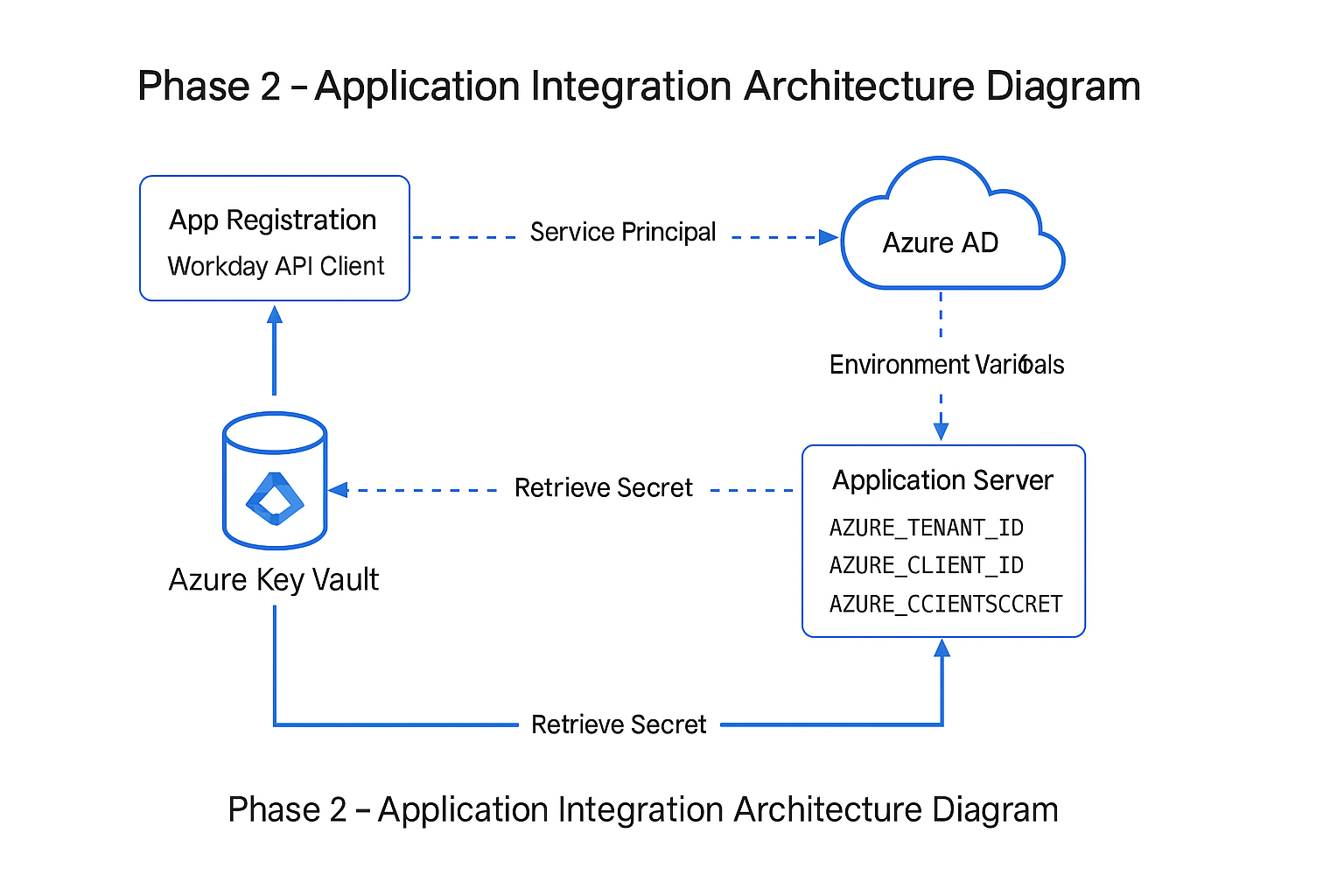
In Phase 2, I extended my Azure Key Vault project by integrating it with a real application scenario for our Workday API integration effort. The objective was to enable secure, non-interactive access to secrets using an Azure AD App Registration and service principal authentication. This allows the application to authenticate using environment variables instead of developer credentials, ensuring a production-ready, least-privilege security model.
Overview
The Workday API Client requires programmatic access to credentials stored in Azure Key Vault (e.g., usernames, passwords, and API keys). To support this securely, I created a dedicated Azure AD App Registration named Workday API Client, generated a client secret, assigned Key Vault RBAC permissions, and validated end-to-end authentication using Azure CLI and the Azure SDK.
Steps Performed (GUI Workflow)
1. Created App Registration: “Workday API Client”
I created a new single-tenant App Registration in Azure Active Directory. This provides a unique application identity and isolates permissions from any existing Workday system integrations.
2. Generated a Client Secret
Under Certificates & Secrets, I generated a secure client secret for the application. The secret value is used to authenticate the application server and is treated with the same sensitivity as a password.
3. Collected Application Credentials
The following values were provided to the development team for use as environment variables:
- AZURE_TENANT_ID – Directory (tenant) ID
- AZURE_CLIENT_ID – Application (client) ID
- AZURE_CLIENT_SECRET – Client secret value
4. Assigned Key Vault RBAC Permissions
Using RBAC-only mode, I assigned the service principal the Key Vault Secrets User role. This grants read-only access to secrets while following least-privilege best practices.
5. Validated Authentication Using Azure CLI
I verified that the application could authenticate by logging in with:
az login --service-principal --username <client-id> --password <secret> --tenant <tenant-id>
Then I confirmed that the service principal could read secrets:
az keyvault secret list --vault-name <your-key-vault-name>
6. Delivered Variables to the Developer
I provided the required environment variables to the developer, who uses the Azure SDK’s ClientSecretCredential class to authenticate and retrieve secrets:
new ClientSecretCredential(tenantId, clientId, clientSecret);
Why This Matters
This phase demonstrates how Azure Key Vault integrates into real enterprise applications through secure identity, least-privilege RBAC, and service principal authentication. It shows the complete story—from vault deployment to application consumption—and highlights collaboration between infrastructure and development teams. This makes the Key Vault deployment truly production-ready.
Phase 2 – Terraform Code (App Registration + RBAC Integration)
############################################################
# Phase 2 – Application Integration (Workday API Client)
# Azure AD App Registration + Service Principal + RBAC
############################################################

# -------------------------------------------
# Data source: retrieve current tenant details
# -------------------------------------------
data "azurerm_client_config" "current" {}

# -------------------------------------------
# App Registration (Azure AD Application)
# -------------------------------------------
resource "azuread_application" "workday_api" {
  display_name = "Workday API Client"

  owners = [
    data.azurerm_client_config.current.object_id
  ]
}

# -------------------------------------------
# Service Principal for the Application
# -------------------------------------------
resource "azuread_service_principal" "workday_api" {
  client_id = azuread_application.workday_api.client_id
}

# -------------------------------------------
# Client Secret for Workday API Client
# -------------------------------------------
resource "azuread_application_password" "workday_api" {
  application_id     = azuread_application.workday_api.id
  display_name       = "workday-api-client-secret"
  end_date_relative  = "8760h"   # 1 year expiration
}

# -------------------------------------------
# Retrieve Key Vault resource (Phase 1 vault)
# -------------------------------------------
data "azurerm_key_vault" "workday_vault" {
  name                = "kv-workday-appsecrets"
  resource_group_name = "rg-workday"
}

# -------------------------------------------
# Assign RBAC: Key Vault Secrets User
# Allows read-only access to secrets
# -------------------------------------------
resource "azurerm_role_assignment" "kv_spn_secrets_user" {
  scope                = data.azurerm_key_vault.workday_vault.id
  role_definition_name = "Key Vault Secrets User"
  principal_id         = azuread_service_principal.workday_api.id
}

############################################################
# Outputs for application integration
############################################################

output "workday_api_client_id" {
  value = azuread_application.workday_api.client_id
}

output "workday_api_tenant_id" {
  value = data.azurerm_client_config.current.tenant_id
}

output "workday_api_client_secret" {
  value     = azuread_application_password.workday_api.value
  sensitive = true
}