Automated Serverless Image Processing Pipeline (AWS GUI Deployment)
Overview:
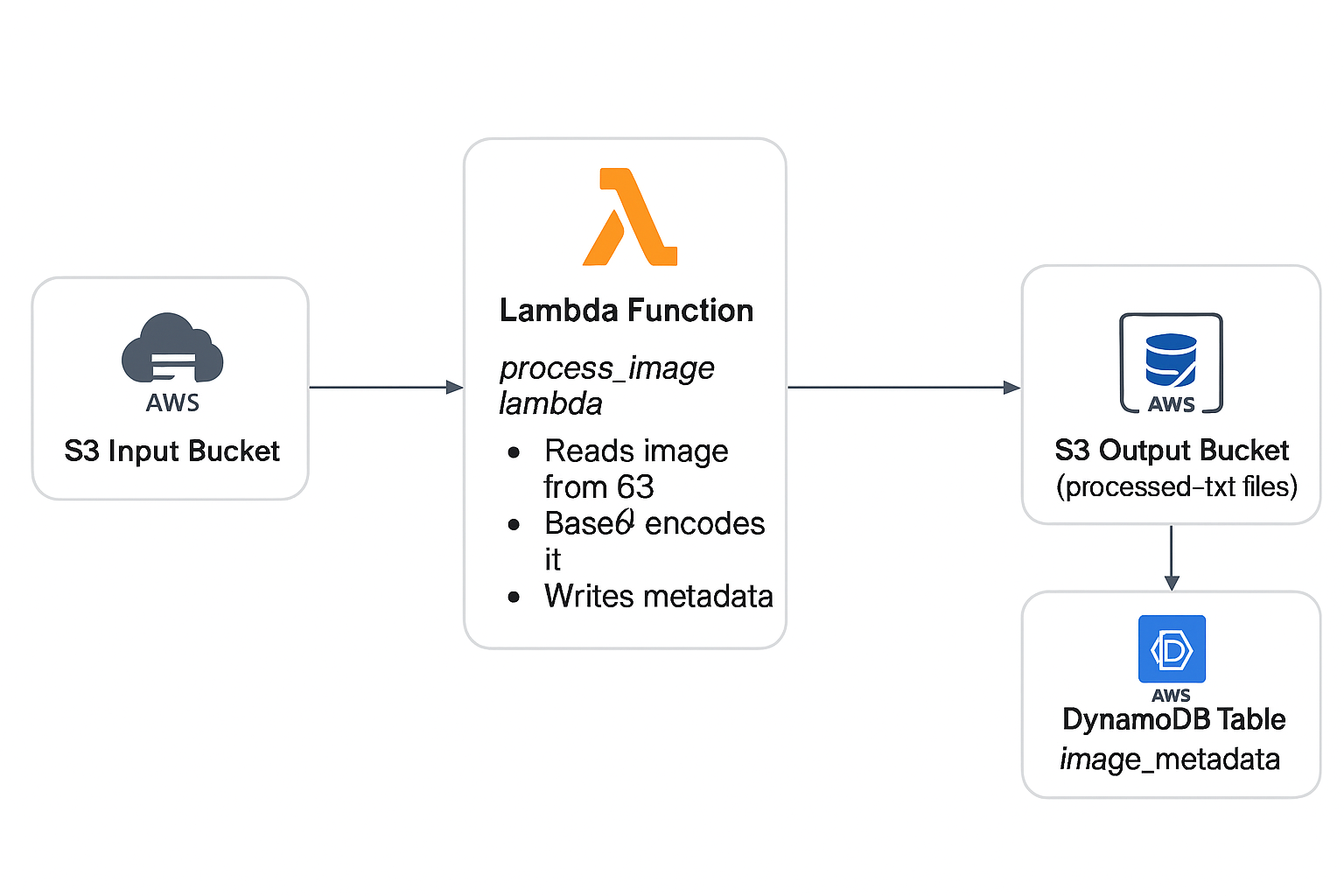
This project demonstrates how I designed and implemented a fully serverless, event-driven image processing pipeline using the AWS Console (GUI). When an image is uploaded to an S3 input bucket, a Lambda function automatically Base64‑encodes the file and stores the processed output in a destination S3 bucket, while DynamoDB records metadata. This project was built entirely without CloudShell, Cloud9, Lambda Layers, or external dependencies.
Architecture Diagram:
Technologies Used
- AWS Lambda (Python, zero external dependencies)
- Amazon S3 (Input & Output buckets)
- DynamoDB (Metadata logging)
- S3 Event Notifications
- CloudWatch Logs
- AWS Console (100% GUI deployment)
Implementation Steps
1. S3 Buckets
- Created image input bucket
- Created processed output bucket
- Enabled S3 PUT event notifications
2. DynamoDB Table
- Created
image_metadatatable - Partition key:
image_id
3. Lambda Function
- Created
process_image_lambdausing Python 3.10 - Implemented pure Base64 encoding logic
- Added structured logging + error handling
- No Pillow, no dependencies, no layers
4. S3 Event Trigger
- Configured input bucket to trigger Lambda on new uploads
5. End-to-End Testing
- Uploaded test images
- Validated Lambda logs in CloudWatch
- Confirmed Base64 output in the processed bucket
- Verified DynamoDB metadata entries
Issues Encountered & Solutions
1. Pillow / PIL Failing to Import
Account restrictions prevented building or attaching Lambda layers, resulting in repeated
No module named 'PIL' errors.
Solution: Replaced all imaging operations with pure Python Base64 logic.
2. Runtime Locked at 3.12
Lambda was set to Manual Runtime Management, preventing version changes.
Solution: Switched to Automatic Runtime Management, enabling Python 3.10.
3. No CloudShell / No Cloud9
Could not build or upload compiled libraries.
Solution: Built a zero-dependency solution using only the GUI.
Final Outcome
- Serverless event-driven architecture
- Runs in restricted AWS environments
- Metadata stored automatically in DynamoDB
- Low cost, highly scalable, no maintenance
Architecture Diagram (Text Version)
┌──────────────────────────────┐
│        S3 Input Bucket       │
└──────────────┬───────────────┘
               │  S3 Trigger
               ▼
    ┌───────────────────────────┐
    │  process_image_lambda     │
    │ - Base64 encode           │
    │ - Metadata logging        │
    └──────────────┬────────────┘
                   │
     ┌─────────────┴─────────────┐
     ▼                           ▼
┌───────────────┐        ┌────────────────────────┐
│ Output S3      │        │ DynamoDB Table         │
│ Base64 .txt     │        │ image_metadata         │
└───────────────┘        └────────────────────────┘
Automated Serverless Image Processing Pipeline (Terraform Deployment)
Overview:
This Terraform phase re‑implements the entire serverless image processing pipeline originally created in the AWS Console. Using Infrastructure as Code (IaC) via Terraform, the deployment becomes fully automated, repeatable, scalable, and version-controlled.
Architecture Diagram (Terraform Version)
Terraform Architecture Diagram Placeholder – will embed once finalized.
Technologies Used
- Terraform – AWS Infrastructure as Code
- AWS Lambda – Python 3.10 serverless function
- Amazon S3 – Input & output buckets
- DynamoDB – Metadata storage
- S3 Event Notifications – Serverless triggers
- CloudWatch Logs – Monitoring
- IAM Roles & Policies – Least-privilege access
- archive_file – Lambda ZIP packaging
- random_string – Globally‑unique bucket suffixes
Terraform Code Samples
Below are selected Terraform snippets demonstrating key parts of the IaC implementation.
S3 Buckets (with randomized names)
resource "random_string" "suffix" {
  length  = 6
  upper   = false
  lower   = true
  numeric = true
  special = false
}

resource "aws_s3_bucket" "input_bucket" {
  bucket        = "george-image-tf-input-${random_string.suffix.result}"
  force_destroy = true
}

resource "aws_s3_bucket" "output_bucket" {
  bucket        = "george-image-tf-output-${random_string.suffix.result}"
  force_destroy = true
}
Lambda IAM Role & Policy
resource "aws_iam_role" "lambda_role" {
  name = "george-image-tf-lambda-role"

  assume_role_policy = jsonencode({
    Version = "2012-10-17"
    Statement = [{
      Action    = "sts:AssumeRole"
      Effect    = "Allow"
      Principal = { Service = "lambda.amazonaws.com" }
    }]
  })
}

resource "aws_iam_policy" "lambda_policy" {
  name = "george-image-tf-lambda-policy"

  policy = jsonencode({
    Version = "2012-10-17"
    Statement = [
      {
        Effect = "Allow"
        Action = ["s3:GetObject", "s3:PutObject"]
        Resource = [
          "${aws_s3_bucket.input_bucket.arn}/*",
          "${aws_s3_bucket.output_bucket.arn}/*"
        ]
      },
      {
        Effect = "Allow"
        Action = ["dynamodb:PutItem"]
        Resource = aws_dynamodb_table.image_metadata_table.arn
      },
      {
        Effect = "Allow"
        Action = [
          "logs:CreateLogGroup",
          "logs:CreateLogStream",
          "logs:PutLogEvents"
        ]
        Resource = "*"
      }
    ]
  })
}
Lambda Packaging & Deployment
data "archive_file" "lambda_zip" {
  type        = "zip"
  source_dir  = "${path.module}/lambda"
  output_path = "${path.module}/lambda.zip"
}

resource "aws_lambda_function" "process_image_lambda" {
  function_name = "george-image-tf-lambda"
  handler       = "lambda_function.lambda_handler"
  runtime       = "python3.10"

  filename         = data.archive_file.lambda_zip.output_path
  source_code_hash = data.archive_file.lambda_zip.output_base64sha256

  role = aws_iam_role.lambda_role.arn

  environment {
    variables = {
      OUTPUT_BUCKET = aws_s3_bucket.output_bucket.bucket
      TABLE_NAME    = aws_dynamodb_table.image_metadata_table.name
    }
  }
}
S3 → Lambda Trigger
resource "aws_lambda_permission" "allow_s3" {
  statement_id  = "AllowS3Invoke"
  action        = "lambda:InvokeFunction"
  function_name = aws_lambda_function.process_image_lambda.function_name
  principal     = "s3.amazonaws.com"
  source_arn    = aws_s3_bucket.input_bucket.arn
}

resource "aws_s3_bucket_notification" "input_trigger" {
  bucket = aws_s3_bucket.input_bucket.id

  lambda_function {
    lambda_function_arn = aws_lambda_function.process_image_lambda.arn
    events              = ["s3:ObjectCreated:*"]
    filter_suffix       = ".jpg"
  }

  depends_on = [
    aws_lambda_permission.allow_s3,
    aws_s3_bucket_acl.input_bucket_acl
  ]
}
Issues Encountered & Solutions
1. Missing S3 → Lambda Event Notification
Terraform deployed all resources, but the Lambda never executed. The bucket notification was not attaching due to dependency order.
Solution: Added depends_on for IAM permission + ACL.
2. DynamoDB Key Mismatch
Terraform created a table with key image_name while Lambda wrote image_id.
Solution: Updated Lambda to use image_name.
3. Lambda ZIP Not Rebuilding
Terraform’s archive_file cached old ZIP unless timestamps changed.
Solution: Touched the Lambda file to force a rebuild.
4. Wrong Bucket Used During Testing
Uploads were sent to the GUI bucket, so the Terraform Lambda never triggered.
Solution: Used Terraform output bucket names during testing.
5. Python Indentation Error
A formatting issue caused Lambda init failure (UserCodeSyntaxError).
Solution: Replaced the entire file with a validated version.
6. S3 Trigger Not Applying Until Second Apply
S3 could not attach the trigger until IAM permission existed.
Solution: Enforced dependency ordering.
Final Outcome
- Fully automated, Terraform-driven deployment
- Reproducible serverless pipeline
- Version-controlled infrastructure
- One-command provisioning:
terraform apply